Free previewSign in

FROM REFERENCE TO WORDS

NSFW Image to Prompt

Keep the details. Find the words.

Turn a reference into a complete image prompt and negative prompt. Describe the subject, pose, framing, color and light in the language you choose.

01 Your reference

1 credit / image
Output language

Your image stays on your device until you analyze it.

Sign in to analyze

02 Your prompt

Your reference, put into words.

Get a complete prompt and negative prompt, ready to edit, copy or use in your next image.

Subject & poseFraming & styleColor & lighting
Prompt + Negative Prompt15 output languagesNo public upload gallery

LOOK AT THE IMAGE. READ THE RESULT.

Real references.
Real prompt outputs.

Explore portraits, textured illustrations and multi-panel stories. Open an example to compare the image with its full prompt and negative prompt, then adapt the wording.

Photography · English

Sunlit coastal fashion

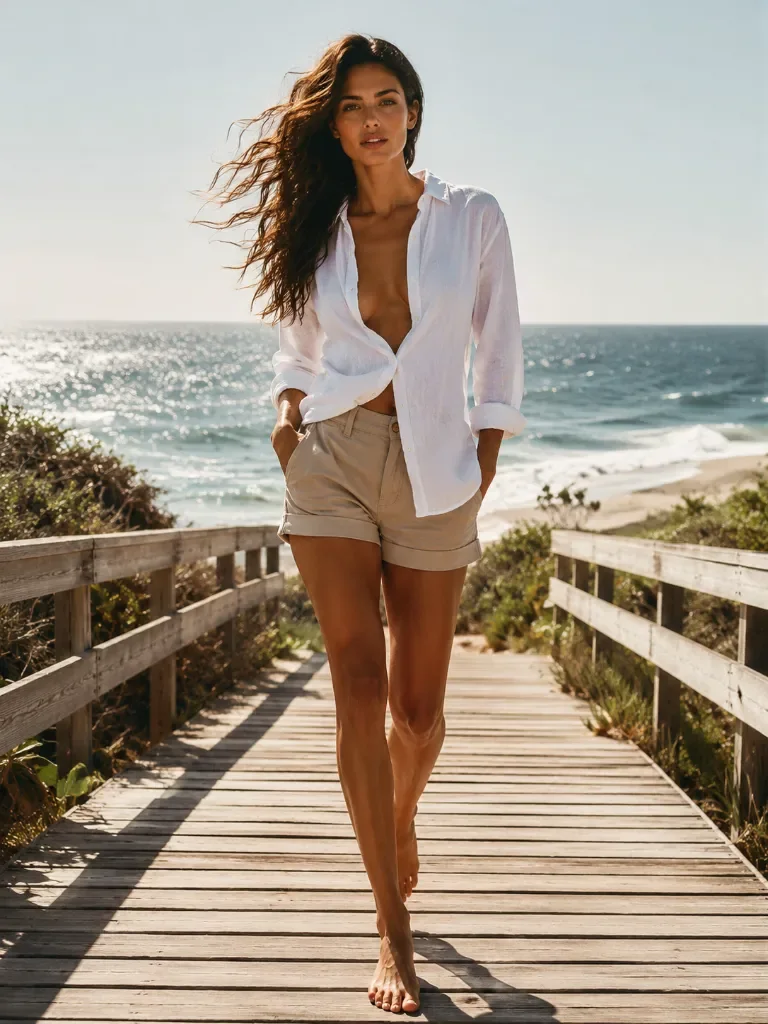
A vertical full-body photograph of a woman with long, wavy dark brown hair blowing in the wind, walking barefoot towards the camera on a wooden boardwalk. She is wearing an unbuttoned white shirt and beige shorts with rolled hems, her hands tucked into her pockets. The boardwalk is flanked by wooden railings and green coastal vegetation. In the background, a sandy beach meets a sparkling blue ocean under a clear sky. Bright sunlight casts long shadows across the wooden planks, highlighting the texture of the wood and her skin.

Photography · English

A close-up on the city street

A hyper-realistic extreme close-up portrait of a young woman facing the camera directly. She has light brown hair pulled back loosely with messy strands framing her face and forehead. Her eyes are a striking green-grey color with long, distinct eyelashes and natural eyebrows. Her skin is fair with visible texture, pores, and subtle freckles. She has slightly parted lips with a natural nude-pink tint and wears small gold stud earrings. She is wearing a thick, textured black coat with a high collar, and a thin silver chain strap is visible on her shoulder. The background is a blurred urban street scene featuring European-style architecture, a shop window with warm light on the left, and a blue street sign on the right. Soft, diffused natural lighting, likely overcast, creating even illumination on the face. Shallow depth of field keeping the focus sharp on the eyes and face while blurring the background.

Illustration · Japanese

Rainy street in pixel art

ピクセルアートスタイルの画像。茶色のミディアムヘアの若い女性が、赤い傘をさして微笑んでいる。彼女は青いトレンチコートと白いシャツを着ている。背景はぼやけた都市の夜景で、黄色い光が点在し、雨上がりの湿った地面の反射が見える。クローズアップショット。レトロなビデオゲームのような質感。明確なピクセル境界線。

Illustration · Simplified Chinese

A red umbrella in watercolor

水彩画风格,年轻女性的半身肖像,棕色齐肩微卷短发,面带温和微笑,眼神看向右侧。她穿着一件蓝色的风衣外套,内搭白色衬衫。右手握着一把鲜红色的雨伞柄,巨大的红色伞面占据了画面的上方。背景是模糊的雨中城市街道,可以看到远处模糊的人影和温暖的黄色灯光。色彩以蓝色和红色为主,带有明显的水彩晕染笔触,画面呈现出明显的低分辨率像素块和复古数字艺术的质感。

Comics · English

A four-panel space-station story

A four-panel comic strip layout arranged in a 2x2 grid. Top-left panel: A young woman with dark curly hair tied in a messy bun and freckles, wearing a teal mechanic's jumpsuit, is repairing a circuit board with exposed colorful wires using a screwdriver. She rests her left cheek on her left hand, looking focused. The background is a metallic spaceship corridor with overhead lights. Top-right panel: The same woman looks up thoughtfully to her right, her left hand raised near her face, still holding the screwdriver in her right hand over the equipment. The lighting is dimmer and moodier. Bottom-left panel: The woman (seen from the back/side) faces an Asian man with short black hair wearing an orange astronaut suit with suspenders. He is smiling broadly, holding a round birthday cake with white frosting, strawberries, and lit candles on a metal tray towards her. Warm interior lighting. Bottom-right panel: The couple is laughing joyfully. The woman is looking up with her mouth open, hands reaching out. Pieces of cake and cream are floating in zero gravity around them. In the background, a large circular spaceship window reveals planet Earth and floating space debris against the starry void. The bottom-right panel has rounded corners.

Comics · English

Six panels at a mountain teahouse

A vertical comic strip consisting of six panels, watercolor and ink wash illustration style. Top wide panel: A young woman with short dark hair, wearing a rust-red hooded jacket and carrying a large hiking backpack, is climbing up stone steps on a mountainside, her left hand touching a rock, looking upwards with an expression of effort or surprise. Background features misty mountains and pine trees. Middle row, left panel: The same woman seen from behind, walking towards a traditional wooden building with a tiled roof and hanging lanterns, surrounded by autumn foliage and stone walls. Middle row, right panel: The woman in profile facing a man with long dark hair tied in a bun, wearing a dark blue traditional Chinese-style shirt. The man is handing her a steaming ceramic cup. Background shows wooden shelves with jars. Lower middle row, left panel: Close-up of the woman's face, eyes closed, holding the steaming cup with both hands near her mouth, enjoying the warmth. Lower middle row, right panel: The woman and the man are pushing a rectangular wooden table together on an outdoor terrace. The woman is on the left, the man on the right. Background shows a sea of clouds and distant mountains. Bottom wide panel: Back view of the two characters sitting at the wooden table on the terrace. The woman is on the left, the man on the right. On the table are a teapot and cups. They are looking out at a vast landscape of layered mountains and clouds with sunlight breaking through. Foreground has branches with red leaves. Overall style: Soft brushstrokes, watercolor texture, warm tones for clothing and wood contrasting with cool blue-grey tones for the mountains and mist, serene and healing atmosphere.

01 / WHAT TO PUT INTO WORDS

Same subject.
Different visual language.

Compare six styles

A photograph, anime portrait and ink drawing need different descriptions. These six references show the details worth keeping when you turn an image into a prompt.

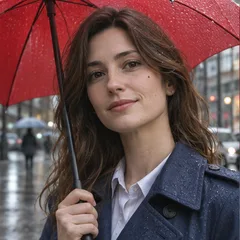
Photography reference: woman holding an umbrella on a rainy street
Photography / wording example

Describe the image you actually have.

Square chest-up photograph of a brown-haired woman beneath a red umbrella on a rainy city street. She faces the camera, holding the umbrella shaft beside her face, and wears a navy coat over a pale collared shirt. Raindrops cover the umbrella and coat; buildings and pedestrians recede into a softly blurred background. Soft overcast light, natural skin texture, muted blue clothing against the red umbrella.

02 / A SMALLER GAP BETWEEN SEEING AND MAKING

From an image
to your next idea.

Start with a reference you have permission to use. Analysis creates text; you decide what happens next.

01

Add your reference

Drop an image, choose a file or paste a screenshot into the image area. Preview it at full size before you continue.

02

Choose a language

English is selected by default. The full prompt and negative prompt both follow your selected language. Analyze one image for 1 credit.

03

Edit, copy or create

Keep the description as it is, or change a detail. Download both prompts as a TXT file, or bring your edited main prompt into the image generator.

03 / ACCURACY BEFORE EMBELLISHMENT

The visible details
do the work.

A useful image description explains what is in the frame. It does not add a new character, change the pose or invent a story outside it.

Subject & pose

Visible appearance, clothing, expression, body position, objects and their relationships.

Composition

Image proportions, subject placement, close-up or wide view, camera angle and depth.

Art & materials

Photography, illustration, anime or CG, with the surface textures that distinguish them.

Lighting

Direction of light, shadow placement, contrast, reflections and exposure.

Color

Dominant colors, warm and cool areas, saturation and the balance between them.

Negative prompt

Unwanted changes or visual artifacts to avoid when recreating the reference.

04 / CHOOSE THE RIGHT NEXT STEP

Recreate a look.
Or change the original.

An image-to-prompt description gives you a new starting point. An image editor works from the actual pixels of your reference. Choose for the result you need.

START A NEW IMAGE

Describe → edit the prompt → generate

Keep the framing and lighting, change the setting or clothing, and explore a new image from text. Results can vary between image models.

AI image generator
KEEP THE EXISTING IMAGE

Upload → describe the change → edit

For a focused change to a picture you already have, pass the original image to the editor. A text description alone does not lock facial identity or exact placement.

AI image editor

FROM DESCRIPTION TO DIRECTION

Keep the look.
Change one thing.

Keep the parts you like, then replace a single detail.

Woman in a white shirt and beige shorts on a sunlit coastal boardwalk
A SHORT CAPTION

A woman walking by the sea.

A MORE USEFUL STARTING POINT

Vertical full-body photograph, the woman walking toward the camera on a wooden coastal boardwalk. Long brown hair blowing sideways, loose white shirt and beige shorts, bare feet. Wooden railings and green plants lead toward the blue ocean. Bright sunlight, defined railing shadows on the planks, natural warm skin tones.

Framing & movementVisible subjectLight & palette

Try one replacement

Change the outfit
Replace “loose white shirt and beige shorts” with “a light blue linen shirt and white shorts.”
Change the time
Replace the sunlight clause with “low evening sun from the side, warm rim light, long soft shadows.”
Change the medium
Replace “photograph” with “watercolor illustration, translucent washes and visible paper grain.” Keep the subject and framing; remove negative terms that exclude painting.
Try your own wording in the image generator

BEFORE YOU ANALYZE

A better reference
leaves less to guess.

Check the whole frame in the preview.

Add your reference

Keep the framing you want

Upload the complete composition when placement and background matter. A tight crop cannot tell the model what was outside the frame.

Make the important detail readable

Choose an image where the face, hands or outfit are large enough to inspect. Blur and occlusion can turn a visible detail into a guess.

Remove interface clutter

Use the image itself when possible. Screenshot buttons, captions and overlays can become part of the description.

Keep comic panels together

For a full-page prompt, keep the borders and all panels visible. Check the reading order and repeated characters in the result.

PUT EACH PART IN THE RIGHT PLACE

From the result
to your image tool.

A visual description is a starting point. Image settings still belong in the tool that creates your next picture.

What you haveWhere it goesWhat to check
Main promptThe image tool’s prompt field.Keep the subject, composition and visual style. “Use prompt” transfers the edited main text to AINSFW’s generator.
Negative PromptA separate negative field, when supported.Remove terms that conflict with the reference. A blurred background or grainy texture may be intentional.
Aspect ratioThe destination tool’s image settings.Choose a matching portrait, landscape or square setting. Writing “vertical” in a prompt alone does not set the canvas size.
Original referenceThe image editor, if you need to preserve the original.Text describes visible features; it does not lock a person’s identity or exact pixel placement.

A description,
not a hidden-settings detector.

Image analysis cannot recover the exact original prompt, seed or model. Ambiguous details should stay uncertain. Check the text before you use it, especially small objects, hands, lettering and overlapping shapes.

Your upload stays out of public galleries.

Choose a reference locally and upload only when you analyze it. Uploaded files follow our seven-day retention schedule. Save the prompts you want to keep.

How we handle your data

05 / PRACTICAL QUESTIONS

Before your
first analysis.

Image prompts, languages, privacy and what your credit covers.

Where can I turn an NSFW image into a prompt?

Use the image-to-prompt tool on this page: upload or paste your reference, choose a language and select Analyze image. AINSFW returns an editable prompt and negative prompt for 1 credit per image. You can copy the text or send the prompt to the image generator. Open the AI image generator

Can I get a prompt from an image without installing Stable Diffusion?

Yes. Analysis runs in your browser workspace with cloud processing; you do not need a local model, a GPU or a Stable Diffusion installation. The result is ordinary text you can edit and use in an image generator.

Can it recover the exact original prompt, model or seed?

No. It describes what is visible in the image. An image alone does not reliably reveal its original wording, seed, model or hidden settings. A similar description also cannot guarantee an identical new image.

How do I keep the pose and lighting but change the scene?

Analyze the reference first. Keep the pose, framing and lighting descriptions in the result, then edit the setting or other details you want to change. For a focused change to the original image, use the image editor instead of starting a new text-to-image generation. Edit an existing image

Can I paste a screenshot instead of uploading a file?

Yes. Click the image area and paste with Ctrl+V or Cmd+V, or drag in a JPG, PNG or WebP. The preview appears locally. Your image is uploaded only when you select Analyze image. Each image can be up to 10 MB, with sides from 64 to 4096 pixels.

Can I get the prompt in my own language?

Yes. Choose the output language before analysis. English is selected by default. Both the full prompt and negative prompt use your selected language; changing the language after analysis requires a new 1-credit analysis.

What is a negative prompt, and do I need to use it?

It describes unwanted changes or artifacts to avoid when recreating the reference. Use it in the negative-prompt field if your image generator supports one. Some generators only accept a main prompt; a separate negative prompt is optional in those tools.

Does analyzing my image also generate a new image?

No. The 1-credit analysis returns text. “Use prompt” opens the image generator with your edited main prompt already filled in. It does not submit a generation; image settings and the separate generation price are shown there before you generate.

Is my uploaded image public?

Your upload is not added to a public gallery. Images are processed to provide the service, and authorized support or quality review may access records as described in our privacy policy. Uploaded source files follow our seven-day retention schedule; copy or download the text you want to keep. Read the privacy policy

Do I need a reference image or just a prompt idea?

This tool starts from an image. If you want ready-to-edit wording without uploading a reference, use the prompt ideas library. You can then use the image generator to turn your own text into a new image. Browse prompt ideas

How do I turn an anime or illustrated image into a prompt?

Upload the reference and analyze it in your chosen language. Check that the result keeps the linework, shading, palette and texture: watercolor washes, pixel blocks and ink shadows need different wording. Remove any negative terms that contradict those features before generating a new image.

Can I describe a whole comic page with several panels?

Yes. You can analyze one comic-page image. Review the panel count, arrangement and reading order, then check each panel’s characters and actions. Small panels and overlapping frames can be misread. The result describes one page; it does not split the upload into separate image files. Create a comic page

Why does the prompt sometimes get hands or small objects wrong?

Occlusion, small details and similar-looking objects can lead to mistakes in a visual description. Compare the editable result with your enlarged reference. Correct a hand position or object directly, and omit details you cannot verify. You do not need another analysis just to edit the text.

Can I use the result with Stable Diffusion, FLUX or Midjourney?

The main prompt is ordinary descriptive text you can adapt for another image tool. Put the negative prompt in a separate field only if that tool supports it. Set the image ratio and other generation options in the destination tool; the description does not recover or automatically transfer the reference’s hidden settings.

How do I keep the style but change just one part of the image?

Keep the medium, framing, palette and lighting clauses. Replace one subject, outfit or setting clause at a time, and remove any conflicting wording from the negative prompt. Text-to-image makes a new image. For a change that needs to retain the original face or scene, pass the original to the image editor. Make a focused image edit

Bring a reference.
Leave with a prompt.

Describe your image